
Behance - Creative Portfolios
Adobe IncArt & Design
4.52.14K Reviews
- Version
- 26.813.952
- Installs
- 10.00M
- Age Rating
- Mature 17+
Screenshots
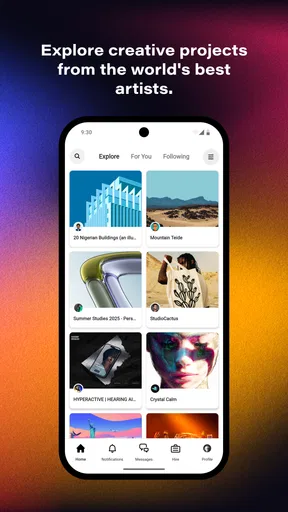
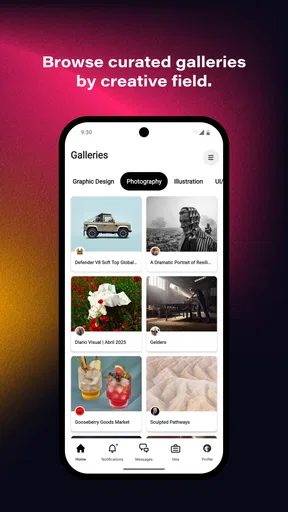
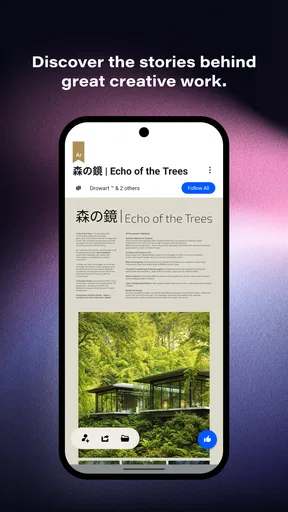
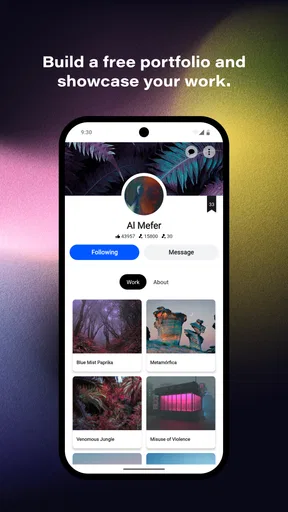
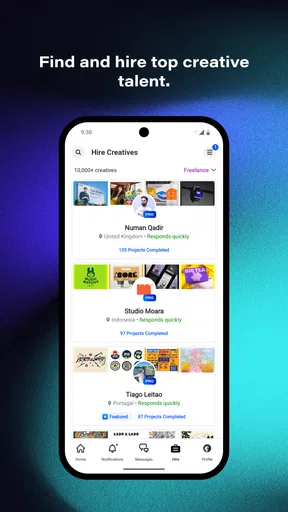
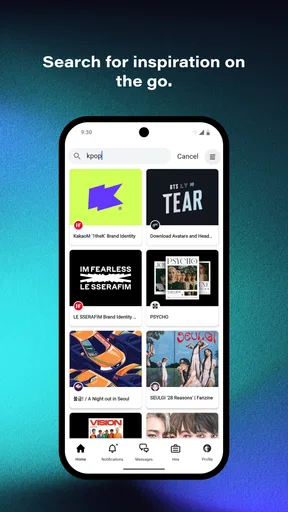
Our Review of Behance - Creative Portfolios
 Analysis by Appyee
I use Behance when I want to see what working creatives are making, understand how a project came together, and share my own visual work in a place built around portfolios rather than quick social posts. That difference matters. It is an art and design app from Adobe Inc, but I do not see it as a mobile replacement for a full design program. I see it as a discovery, presentation, and feedback space that sits beside the tools used to create the work.
The app is free, carries a Mature 17+ content rating, and has been available since June 20, 2014. Its scale is reassuring: it has passed ten million installs and holds a 4.5 average from roughly two hundred thousand ratings, alongside about two thousand reviews. Those figures suggest a well-established community, although popularity alone does not guarantee that every project or interaction will suit every user.
What I look for before choosing a creative portfolio app
My first question is what I actually need. If I want a place to collect visual references, Behance is useful. If I want to publish a polished case study, it is more useful still. If I need to draw, edit photographs, build layouts, or produce finished video inside the same app, I would look elsewhere or use a dedicated creative tool alongside it.
I also judge a portfolio platform by the quality of context it gives to the work. A single image can look impressive while saying very little about the designer’s decisions. Behance is at its best when a project is presented as a sequence: the finished result, supporting visuals, process images, and an explanation that helps viewers understand the problem being solved. That makes browsing more educational than scrolling through isolated pictures.
Another decision point is the kind of attention you want. This is not simply a private gallery. It is a public-facing creative community where people look for inspiration, share projects, learn, and exchange feedback. That can be motivating, but it also means I have to think carefully about what I publish, how much context I provide, and whether I am comfortable receiving reactions from a broad audience.
For someone choosing between Behance and a general social network, I would ask whether the work should be judged as a project or consumed as a post. General platforms are often faster for immediate reach and casual updates. Behance feels more deliberate. The trade-off is that preparing a project takes more thought, but the result can communicate far more than a single image with a short caption.
My first experience of the portfolio workflow
When I open the app, I am not pushed into a blank canvas and asked to start creating from scratch. The experience is centered on seeing creative work and moving through other people’s projects. That makes it easy to begin as a learner. I can study how a branding presentation is arranged, how a photographer sequences images, or how an illustrator explains a visual direction before deciding whether I want to publish anything myself.
The most useful habit I developed was to browse with a question instead of scrolling without a goal. For example, I might look at how designers present a logo system, how a poster series maintains consistency, or how a case study introduces its challenge. This turns the feed into a practical reference library. I notice not only the final artwork but also the choices around order, captions, mockups, and presentation.
That is one of the app’s less obvious strengths: it teaches presentation by showing presentation. A beginner can learn that a strong portfolio entry is not necessarily the project with the most decoration. Often, the clearer project is the one that explains its purpose, limits, iterations, and final outcome without making the viewer work too hard.
Why Behance works especially well for creative discovery
In my experience, the community format gives the app more value than a simple image gallery. I can follow visual directions over time, compare approaches to similar design problems, and find references outside the style I normally choose. That last point is important because a portfolio app can expose me to techniques I would not encounter in my usual client work or personal feed.
I also like that the environment encourages me to slow down. A fast social feed rewards immediate impact, while a portfolio-oriented presentation gives room for a project to unfold. That makes Behance a better fit when I want to understand the thinking behind a piece rather than merely save a striking thumbnail.
For students, the app can function as an informal study companion. I would use it to collect examples before beginning a class assignment, then compare my own presentation with the work of more experienced creators. The goal should not be to copy a style. It should be to identify how other people solve familiar communication problems: hierarchy, pacing, consistency, and explanation.
For professionals, the value is different. A carefully assembled project can help explain capability to a potential client or collaborator. I would not treat a profile as a complete substitute for a tailored proposal, but it can provide evidence of how I think and how I finish work. The strongest entries are likely to be the ones that show judgment, not just technical polish.
Three practical habits that improve the experience
My first tip is to separate inspiration from imitation. When I save or revisit a project mentally, I try to write down what attracted me: the typography, the narrative order, the restraint, the color relationship, or the way the creator showed revisions. Naming the reason prevents a vague collection of attractive images from becoming an unhelpful mood board.
My second tip is to build a project around a viewer’s questions. Before publishing, I ask what the work was for, what part I made, what changed during development, and what the final images prove. This is more effective than uploading every available asset. A shorter, clearer presentation can make the main idea easier to understand.
My third tip is to use the app as a feedback checkpoint rather than waiting until a project feels perfect. Sharing an early direction, a selected sequence, or a near-final presentation can reveal where the explanation is confusing. I would still be selective about unfinished client material, but the principle is valuable: feedback is most useful while a decision can still change.
A fourth habit is to look beyond the cover image. The cover may attract attention, but the internal order determines whether the project feels convincing. I pay attention to whether the supporting images answer questions or merely repeat the same visual. That simple check helps me make portfolio work more informative and less decorative.
A realistic everyday use case
Imagine I am preparing a small identity project for a local café. During the research stage, I browse Behance to compare how other designers show a logo across menus, packaging, signage, and digital screens. I am not searching for a ready-made answer. I am studying how a visual system proves its flexibility.
After developing my own direction, I organize the project so the viewer sees the problem first, then the core mark, supporting typography, color choices, and practical applications. I include only the visuals that help explain the system. On a phone, I can review the sequence as a viewer would and catch a weak transition or an image that appears too early.
Later, I might share the finished presentation and use the response as one part of my review process. I would not measure the project only by attention. A useful reaction could point out that the concept is strong but the explanation is unclear, or that the applications do not demonstrate enough range. That kind of observation is more valuable than simply seeing a high number of casual reactions.
Where the app wins against familiar alternatives
Compared with a general image-sharing network, Behance gives creative work a more natural home. The portfolio mindset makes it easier to present a series, explain a process, and show a finished result in context. A general network may be better for personal updates, quick announcements, or reaching friends who do not regularly browse design work. For serious visual presentation, I prefer the more focused setting here.
Compared with a private cloud folder, the community is the major advantage. A folder is excellent for storing files and controlling access, but it does not provide the same discovery or learning loop. Behance can help me see how other creatives communicate their work and can give my own projects a public frame. The compromise is that public sharing requires more care than sending a private file.
Compared with a full desktop portfolio website, the app is easier to use casually and better suited to browsing on a phone. A personal site gives me more control over branding, navigation, domain presentation, and the overall visitor journey. I would choose that route when I need a highly customized professional presence. I would choose Behance when I want a ready-made creative community and a lower-friction way to show projects.
Compared with creation-first apps, its role is complementary rather than competitive. A drawing, photo-editing, or layout application helps me make the artifact. Behance helps me study, present, and discuss it. Expecting one to replace the other leads to disappointment. The better workflow is to create in the tool suited to the task, then use the portfolio platform to explain the result.
Where another option may fit better
I would not recommend Behance as the main choice for someone who wants a private, offline notebook for sketches. The community orientation is central to its appeal, so a local notes or drawing app may be more comfortable for personal experiments, sensitive drafts, or material that is not ready to show.
I would also steer a user toward a personal website when complete control over presentation is the priority. A website can be shaped around one career, studio, or service offering, while a community platform places the work within a broader stream. That broader setting is useful for discovery, but it may not deliver the focused brand experience a senior freelancer or agency wants.
Someone who mainly wants rapid interaction with friends may find a mainstream social network more convenient. Behance asks for a different kind of participation. It rewards thoughtful projects and visual communication more than constant casual posting. If I only wanted quick reactions to everyday images, I would not choose it for that purpose.
There is also a learning curve in deciding how much detail to include. Too little explanation makes a project feel like a gallery of disconnected images. Too much text can bury the visual work. The app does not solve that editorial problem automatically; I still need to make decisions about sequence, captions, and emphasis.
What switching to Behance really involves
The financial barrier is low because the app is free, but the real cost is preparation. Moving from scattered posts or a private folder means selecting projects, exporting suitable images, writing context, and checking that the sequence makes sense on a smaller screen. I consider that time well spent when I want a durable presentation, but it is still work.
There is also a psychological cost. Publishing a portfolio can make unfinished work feel permanently judged, even when the actual purpose is learning. I manage that by separating experiments from work I want to represent professionally. I also avoid treating every response as a verdict on my ability. Feedback is information, not a complete evaluation.
If I already maintain a personal website, I would not move everything automatically. Instead, I would choose a few projects that benefit from community discovery and keep the website as the more controlled home base. That hybrid approach avoids duplicating every update while still using Behance where it has a clear advantage.
Device compatibility is worth checking before committing to a mobile workflow. The current version is 26.813.952 and the app requires Android 8.0 or newer. I would make sure an older phone meets that requirement before planning to use it as my main browsing or publishing device. On supported hardware, the app is convenient for reviewing work away from a desk, but detailed portfolio preparation may still feel more comfortable on a larger screen.
Who should use it and who should skip it
I think Behance is a strong match for illustrators, photographers, graphic designers, motion artists, students, art directors, and curious learners who want to see work in context. It is especially useful for anyone who is trying to improve how they explain a project, not just how they make one.
I would recommend it to a beginner who feels overwhelmed by professional portfolios, provided they browse actively rather than comparing their first attempts with polished work. Studying project structure can make the path forward clearer. I would also recommend it to an experienced creative who wants a public archive of selected work and a way to encounter ideas outside a personal network.
I would skip it as a primary tool if my main goal were drawing, retouching, animation production, or detailed layout editing. I would also hesitate if I needed a completely private workspace or a highly customized portfolio site. In those situations, a dedicated creation tool, private storage system, or personal website would better match the job.
My recommendation after using it as a decision tool
Adobe Inc has built Behance around a useful idea: creative work becomes more valuable when people can discover it, study it, share it, and discuss it in context. The app’s 4.5 average and large install base reflect broad adoption, but my recommendation is based more on the workflow than on those figures. I return to it because it helps me think about presentation and process, not because it replaces every other creative tool.
My practical recommendation is to try it when your decision is about portfolio visibility, visual research, or constructive creative feedback. Start by following work related to a specific problem, then publish one carefully edited project instead of uploading everything. Review the sequence on your phone, remove repeated images, and make sure the explanation tells the viewer why the work matters.
If you want a private sketchbook, a fast social feed, or a fully controlled professional website, choose a more specialized alternative. If you want a free art and design community that can inspire you while teaching you how projects are presented, Behance is one of the more convincing options. I would treat it as a companion to my creative tools and a public learning space, with the understanding that the quality of the experience depends heavily on the care I put into both browsing and publishing.
Verdict
Strengths of Behance - Creative Portfolios
- Excellent source of inspiration across many creative disciplines.
- Clean interface makes browsing portfolios quick and enjoyable.
- Supports high-quality images, videos, and interactive project presentations.
- Useful networking tools for following creators and discovering fresh work.
- Adobe integration helps creatives showcase work within a larger ecosystem.
Limitations of Behance - Creative Portfolios
- Some portfolios load slowly, especially with large media files.
- The huge amount of content can make standout projects harder to find.
- Job and freelance opportunities may vary greatly by location and specialty.
- Certain features work best with an Adobe account or Creative Cloud services.
- Content quality is inconsistent because anyone can publish a project.
Similar Picks in This Category
View All
Canva: AI Photo & Video Editor
Canva4.8

PENUP – Drawing-sharing SNS
Samsung Electronics Co., Ltd.4.5

Crafto
Kutumb App4.6

Sketchbook
Sketchbook4.1

ibis Paint X
ibis inc.4.5

Adobe Express: AI Photo, Video
Adobe4.6
Frequently Asked Questions
What is Behance - Creative Portfolios used for?
Behance is a platform for discovering, presenting, and sharing creative work. Artists, designers, photographers, illustrators, and other professionals can create portfolios, publish projects, follow creators, and explore work from around the world. The app is also useful for finding inspiration, networking with other creatives, and discovering freelance or full-time job opportunities posted by companies and clients.
Do I need a Behance account to browse creative projects?
You can usually browse a selection of Behance projects without creating an account, which is useful if you only want to explore creative portfolios or find inspiration. However, registering is recommended if you want to follow creators, save projects, appreciate work, comment, personalize your feed, or build and publish your own portfolio. Some interactive and profile-related features require you to sign in.
Can I create and manage my own portfolio in the Behance app?
Yes, Behance allows users to showcase their creative work through organized projects containing images, videos, text, and other presentation elements. The mobile app is convenient for checking your profile, sharing work, and interacting with the community, although creating highly detailed portfolio layouts may be more comfortable on the web version. A complete portfolio should include clear descriptions and high-quality media.
Is Behance free to download and use?
Behance is generally free to download and provides access to a large collection of creative projects, profiles, and community features without requiring a paid subscription. Certain content, services, or opportunities may connect with Adobe products or external platforms that have separate costs or requirements. Before downloading, users should also review current account, privacy, and data policies because features can change.
Is Behance suitable for finding creative jobs and professional opportunities?
Behance can be useful for discovering creative job listings, freelance opportunities, and potential clients, especially when your profile presents polished and relevant work. It should not be treated as a guaranteed employment service, since opportunities depend on your skills, location, experience, and the quality of your portfolio. Users should communicate carefully, verify clients, and avoid sharing sensitive information too early.
